

Ad blockers or VPNs may interfere with opening certain special-offer affiliate links on this page. If a link doesn’t open, please disable them for our site and try again.

As a regular PC user, the most important things to look for in an antivirus are strong security, good performance, and ease of use.
Choosing a suitable antivirus software could be confusing for you in 2026 because plenty of brands out there, and some well-known brands are not suitable for your needs.
After testing the top antivirus software for Windows, these are our recommended picks.
Who is this guide for?
- Users who browse the internet daily
- Users who download files, software, cracks, or torrents from the internet
- Users who use email, open attachments and click links
- Users who make online purchases or pay bills online
- Users who use USB drives or external storage devices regularly
- Users who use remote work, video meeting, or cloud storage apps
And any everyday PC user who wants better security, privacy, and performance.
How did we rank Antivirus Software for Home Users?
We tested each antivirus solution using the same set of conditions to keep the results fair and consistent. Our rankings are based on real-world usage, protection quality, system performance, pricing, and overall user experience.
- Detection Rates: We tested each antivirus program against more than 500 malware samples, including ransomware, trojans, spyware, adware, and potentially unwanted programs (PUPs), to see how effectively they detect and block real-world threats.
- Performance: We tested the impact each antivirus had on overall PC performance, including boot time, browsing speed, gaming, file transfers, and everyday tasks.
- Pricing: We compared pricing, available features, subscription plans, and overall value for money.
- Independent Antivirus Test Scores & Awards: We also considered results, certifications, and awards from trusted independent testing labs such as AV-Comparatives, AV-TEST, and AV-ATLAS.
- Customer Support: We reviewed the quality of customer support, including response times, live chat, email support, knowledge bases, and ease of getting help when needed.
Most regular PC users simply expect an antivirus program to quietly protect their PC in the background without slowdowns or interruptions to their everyday tasks.
And also want to avoid false positives that incorrectly flag safe and trusted programs as threats.
#1 Bitdefender TOTAL SECURITY
| Price : | Starts from $49.99 per year try 50% OFF Promo |
| Supported OS : | Windows, macOS, Android, iOS |
| Free Trial : | Yes, 30 days GET 1-Month FREE |
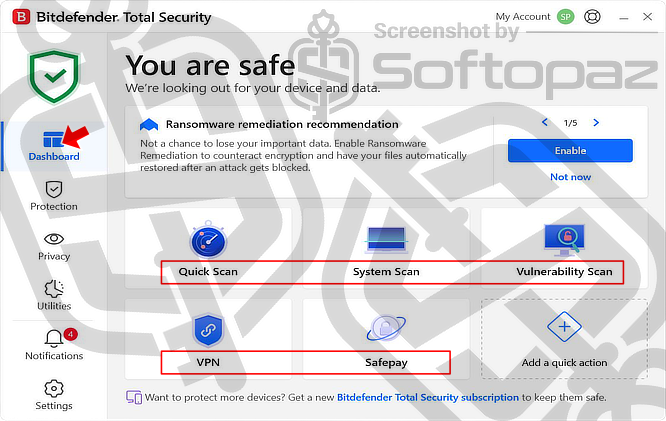
Bitdefender Total Security is our #1 recommended antivirus solution due to its excellent malware protection, strong security features, and lightweight performance.
It uses cloud-based scanning and machine learning technologies to detect and block viruses, ransomware, phishing attacks, spyware, and other online threats in real time without heavily affecting system performance.
In our malware sample tests, Bitdefender performed extremely well against ransomware threats and even zero-day malware. It was able to detect and block even newer ransomware families before they could encrypt files or compromise the system.
System Requirements (recommended)
- Operating System: Windows 11, 10, 8.1/8, 7
- Processor: Dual-Core 1.6 GHz processor or higher
- Memory (RAM): 2 GB RAM or more
- Storage Space: At least 2.5 GB of free hard drive space
- Internet Connection: Required for installation, activation, and updates
Top Features: Security & Privacy
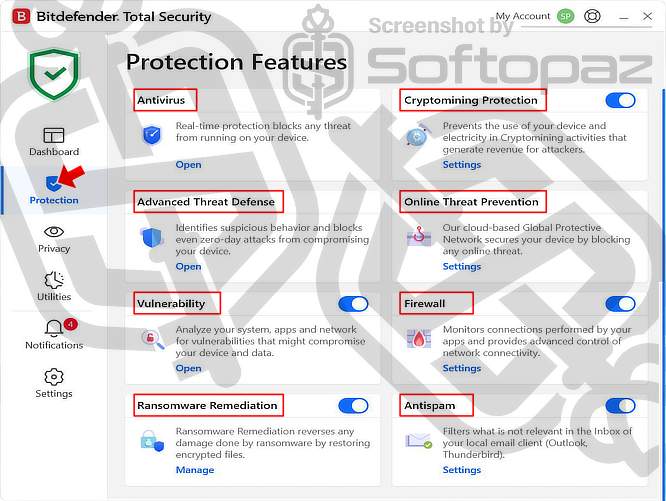
- Real-Time Antivirus Protection: Continuously scans files, downloads, applications, and system activity to block viruses, malware, spyware, and other threats before they can harm your PC.
- Advanced Threat Defence: Detects suspicious application behaviour and helps stop zero-day attacks, ransomware, and unknown threats in real time.
- Online Threat Prevention: Blocks malicious websites, phishing pages, fake downloads, dangerous links, and web-based attacks while browsing the internet.
- Ransomware Remediation: Helps protect important files against ransomware attacks and can restore files affected by unauthorised encryption attempts.
- Firewall Protection: Monitors incoming and outgoing network connections to help prevent unauthorised access to your PC and personal data.
- Vulnerability Scan: Checks your operating system, applications, and network settings for security weaknesses, outdated software, and missing updates.
- Cryptomining Protection: Prevents unauthorised cryptomining activities that can secretly use your CPU, GPU, electricity, and system resources.
- Anti-Spam Protection: Filters spam emails, phishing messages, and potentially dangerous email content in supported email clients.
- Safepay Browser: Provides a secure browser environment designed for online banking, shopping, and other sensitive transactions.
- VPN: Adds an extra layer of privacy by encrypting internet traffic and helping protect your online activity on public or unsecured networks.
- SecurePass: A built-in password manager that securely stores, manages, and autofills your login credentials, helping you use strong passwords more safely across websites and online accounts.
- Anti-Tracker: Blocks tracking scripts and online trackers that collect browsing activity for advertising and profiling purposes.
- Video & Audio Protection: Prevents unauthorised access to your webcam and microphone to help protect your privacy.
- Parental Controls: Allows parents to monitor and manage children’s online activity, screen time, and internet usage across devices.
Independent Test Results & Awards: AV-TEST & AV-Comparatives
You may have seen these badges on the Bitdefender Total Security product box or website.
These badges are awarded by independent cybersecurity testing organizations such as AV-TEST and AV-Comparatives, which regularly test antivirus products from different vendors several times each year under real-world conditions.
AV-TEST: “Top Product”

AV-TEST is one of the most trusted independent antivirus testing organizations in the cybersecurity industry.
Bitdefender Total Security regularly scores the maximum 6/6 points in Protection, Performance, and Usability tests.
It has also received the “Top Product” certification multiple times over consecutive years for maintaining excellent overall test results.
You can view Bitdefender’s latest AV-TEST results here: https://www.av-test.org/en/antivirus/home-windows/manufacturer/bitdefender/
AV-Comparatives: “Top Rated” & “ADVANCED+”
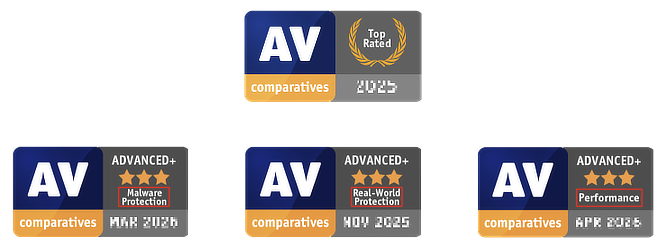
AV-Comparatives is another well-known independent antivirus testing organisation that performs advanced real-world security tests on antivirus software.
Bitdefender Total Security has consistently received the highest “Advanced+” rating with 3 stars in their tests.
You can view Bitdefender’s AV-Comparatives results here: https://www.av-comparatives.org/vendors/bitdefender/
Our Experience
We started using Bitdefender Total Security even before 2018, with its extended 3-month trial.
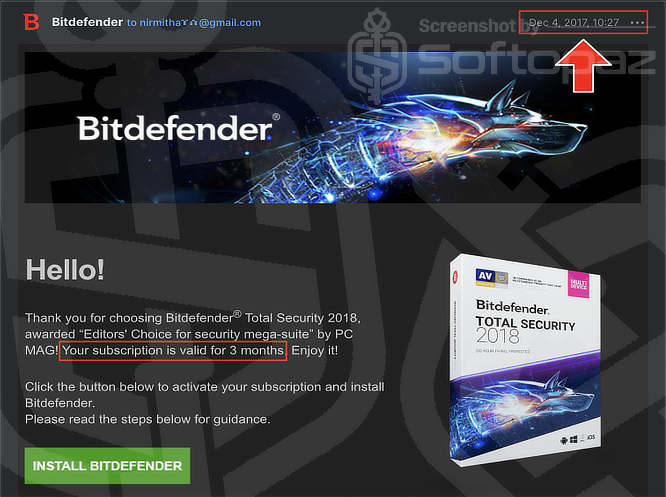
Since then, we have used it for years on our personal PCs in many real-world scenarios.
This includes everyday browsing, downloading files, gaming, testing software, opening email attachments, making online purchases, and even systems exposed to higher-risk activities.
Throughout our experience, Bitdefender Total Security consistently kept our systems protected without any malware infections or security issues.
Note: We never disabled Real-Time Protection or any other security features while performing any of these activities.
Great Performance
Security and performance are equally important for any PC user.
Based on our years of experience, Bitdefender Total Security is lightweight on system resources and runs quietly in the background without slowing down the PC.
Even when running a quick scan, it keeps CPU and RAM usage low.
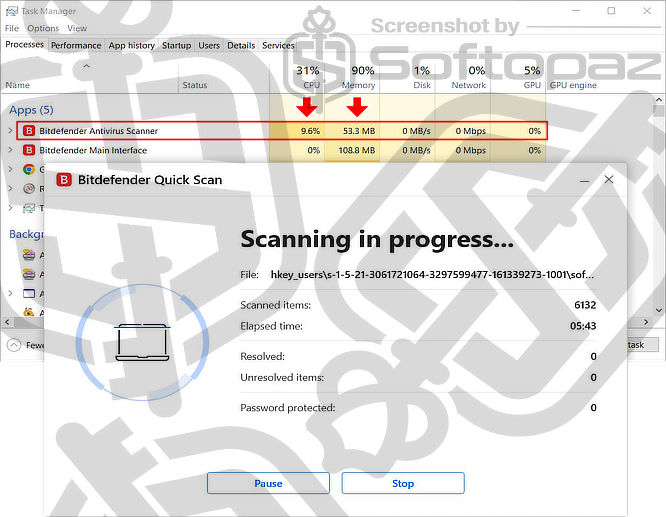
However, if your PC has limited system resources, scans may take a little longer to complete.
This is because Bitdefender intentionally holds back and takes longer to finish, so it doesn’t hog your CPU and freeze your computer.
Problems We Encountered
Even though our overall experience with Bitdefender Total Security has been very positive over the years, we did experience a couple of issues.
Problem 01: Microsoft Edge Freezing After Startup
Our system was a Windows 10 PC with an Intel i3 3rd Gen processor with 12GB of RAM.
We noticed that Microsoft Edge sometimes froze for a few minutes after launching the browser following a fresh system boot.
After testing different settings, the issue appeared to be related to Bitdefender’s encrypted traffic scanning feature.
Solution: Disable “Encrypted Web Scan”
Sometimes, Bitdefender’s “Encrypted Web Scan” feature can interfere with browser certificates, causing Microsoft Edge to temporarily freeze or become unresponsive.
Try the following steps to fix the issue:
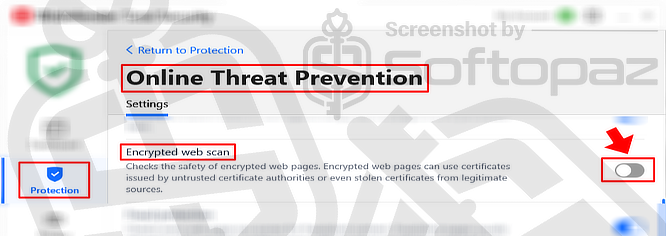
- Open the Bitdefender dashboard
- Go to Protection > Online Threat Prevention
- Toggle OFF Encrypted Web Scan
- Restart Microsoft Edge and check whether the issue is resolved
Problem 02: Unable to Fully Uninstall Bitdefender Using Windows Default Uninstaller
We also experienced issues when trying to uninstall Bitdefender Total Security using the standard Windows uninstall method through:
Settings > Apps > Installed Apps
In some cases, the uninstall process failed or left behind files and services on the system.
Solution: Use the Official Bitdefender Uninstall Tool
To completely remove Bitdefender Total Security from your PC, we recommend using Bitdefender’s official uninstall tool.
Pricing & Plans
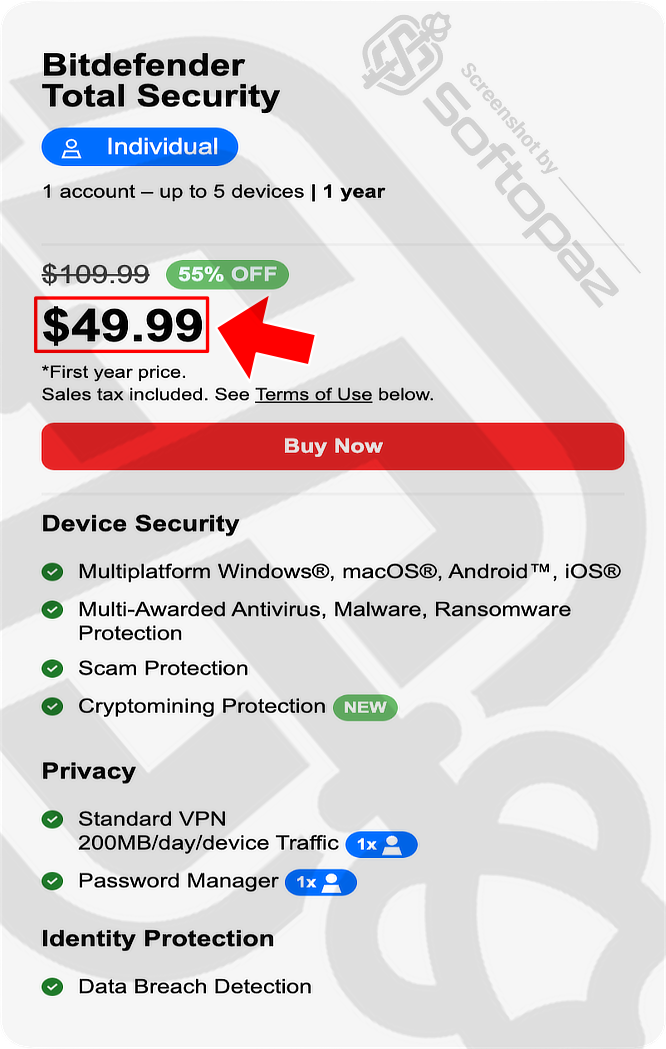
Bitdefender Total Security plans start at $49.99 per year, which covers up to 5 devices under 1 account.
Be Aware of What You Are Subscribing To Before Completing the Order
We have seen many users complain about unexpected renewal charges from Bitdefender, especially on review platforms like Trustpilot.
In most cases, this happens because users unknowingly subscribe to a plan with automatic renewal enabled during checkout.
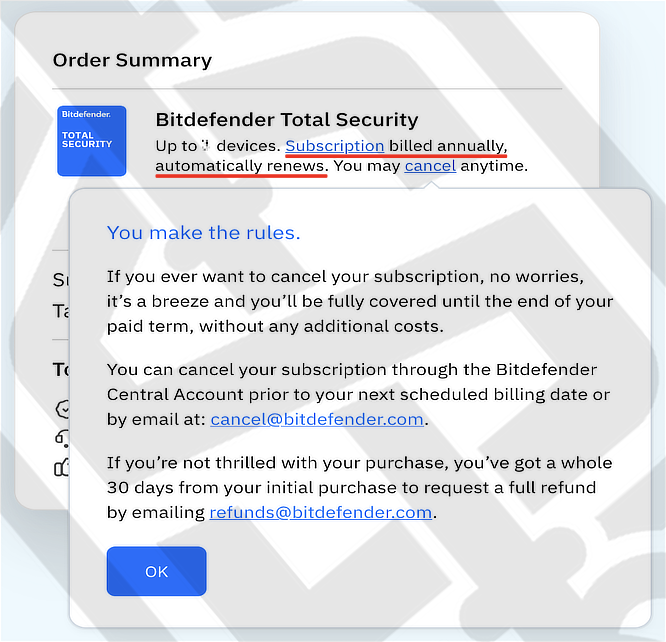
To avoid this, we strongly recommend carefully reading the Order Summary before completing your purchase.
If auto-renewal has already been enabled, you can cancel it anytime through your Bitdefender Central account before the next billing date, or by contacting Bitdefender support at: cancel@bitdefender.com
Just remember, your 1st year is cheaper. Renewal cost is higher.
Check out these exclusive discounts and offers: try 50% OFF Promo
#2 Norton 360
| Price : | Starts from $39.99 per year try 60% OFF Promo |
| Supported OS : | Windows, macOS, Android, iOS |
| Free Trial : | Yes, 7 days (card details may be required) |
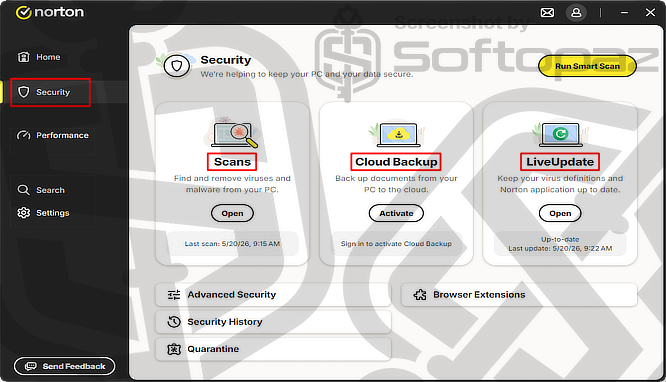
Norton 360 is available in several plans, including Standard, Deluxe, and LifeLock editions. This allows users to choose the features and level of protection that best fit their needs.
Norton 360 is one of the most popular antivirus solutions for Windows users, offering strong protection against malware, ransomware, scams, and other online threats.
Along with antivirus protection, Norton 360 includes useful features such as a secure VPN, password manager, cloud backup, and dark web monitoring to help protect your personal data online.
In our testing, Norton 360 delivered solid malware protection and also received strong scores from independent testing labs like AV-TEST and AV-Comparatives.
However, we found the frequent upselling notifications and promotional pop-ups somewhat annoying during everyday use.
System Requirements (recommended)
- Operating System: Windows 11, Windows 10, Windows 8.1/8, Windows 7 (SP1 or later)
- Processor: Intel Pentium 4 / AMD Athlon 64 processor or higher
- Memory (RAM): 1 GB RAM minimum
- Storage Space: Around 300 MB to 2.5 GB of free disk space recommended
- Internet Connection: Required for installation, activation, updates, and cloud-based features
Top Features: Security & Performance
- Antivirus, malware, and ransomware protection
- Scam and hacking protection
- Smart Firewall
- Secure VPN
- Safe Web Protection
- Intrusion Prevention
- Behavioral Protection
- Exploit Prevention
- Email Protection
- Dark Web Monitoring
- Block Malicious Scripts
- Download Intelligence
- Sandbox
- Quarantine Manager
- Cloud Backup (starts from 2 GB)
- Password Manager
- Wi-Fi Security
- Deepfake Protection
- AI Agent Protection
- Software Updater
- File Cleanup
- Startup Manager
- Optimize Disk
#3 Windows Defender
| Price : | Free (included with Windows 11) |
| Supported OS : | Windows 11, Windows 10 |
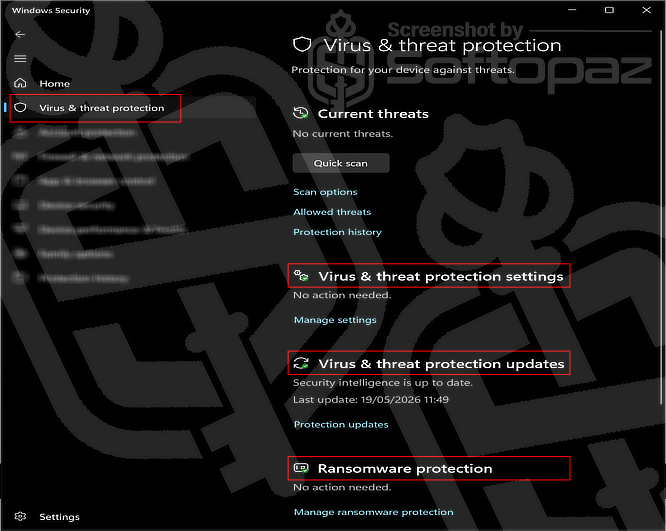
Windows Defender is Microsoft’s built-in antivirus solution for Windows 11 and provides solid protection for everyday users without requiring additional software.
It includes real-time virus and threat protection, ransomware protection, and firewall security while remaining lightweight during normal PC use.
In our testing, Windows Defender delivered reliable protection for everyday tasks, especially for users who want a simple free antivirus solution.
However, its detection can sometimes be weaker against newer or more advanced malware threats compared to premium antivirus solutions.
Protection also depends heavily on safe user behavior, as risky downloads, unsafe websites, and outdated software can still lead to infections.
While Windows Defender offers good built-in security, its phishing protection, web filtering, and advanced security features are generally more limited than products like Bitdefender or Norton 360.
Top Features: Security
- Real-time virus and threat protection
- Ransomware protection
- Cloud-delivered protection
- SmartScreen malicious activity warning
- Bluetooth protection
Other Top Antivirus Programs
Here are some other well-performing antivirus programs that received good scores in AV-TEST and AV-Comparatives security tests.
| Product Name | Is it Good? | Starting Price |
|---|---|---|
| F‑Secure Total | Offers strong malware protection with a clean and easy-to-use interface. Lightweight performance makes it a solid choice for everyday users. | $69.99 / year / 1 device |
| Malwarebytes | Excellent at detecting malware and potentially unwanted programs. Simple interface and fast scans make it easy for beginners to use. | $44.99 / year / 3 devices |
| Trend Micro Maximum Security | Provides strong ransomware and phishing protection for online users. Its web protection features perform well in real-world tests. | $49.95 / year / 5 devices |
| McAfee LiveSafe | Includes a wide range of security, privacy, and PC optimization features for PCs, Macs, smartphones and tablets. However, some users may notice occasional promotional notifications. | $30.00 / year / 1 device |
| Avira Internet Security | Offers good malware protection and lightweight system performance. However, some useful features are limited in lower-tier plans. | $49.99 / year / 1 device |
| TotalAV Internet Security | Includes useful features like Adblock, system cleanup, and web protection. However, some advanced features require additional upgrades or subscriptions. | $129 / year / 6 devices |
| Avast Premium Security | Provides strong malware protection and many extra security tools. However, promotional pop-ups and upselling notifications can be annoying. | $49.99 / year / 2 devices |
| AVG Ultimate | Delivers reliable antivirus protection with good performance scores. However, its interface and notifications can feel cluttered at times. | $59.88 / year / 10 devices |
| ESET Smart Security Premium | Known for excellent malware detection and lightweight system usage. However, some advanced features may feel complicated for beginner users. | $79.99 / year / 1 device |
| Kaspersky Total Security | We do not currently recommend this product due to restrictions and concerns related to the U.S. government ban. | N/A |

Nirmitha is a blogger and software enthusiast with a lifelong passion for exploring and testing computer software. He developed Softopaz to offer global users the opportunity to enjoy full versions of software legally and for free. Before launching this site, he managed hundreds of client projects on platforms like Fiverr.