Wise Program Uninstaller PRO License Key

Other Wisecleaner Products


The software
Overview
Wise Program Uninstaller PRO Overview
Official Website: www.wisecleaner.com
Supported Systems: Windows 11, 10, 8, 7, Vista
Wise Program Uninstaller helps you to completely uninstall unwanted applications, browser extensions, Windows apps, and system components from your Windows computer.
In addition to standard uninstall features, it includes advanced cleanup tools that remove leftover files, registry entries, and other traces that traditional uninstallers often leave behind.
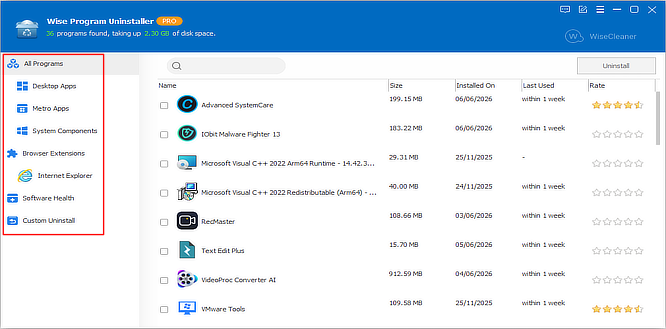
Wise Program Uninstaller’s interface is divided into four main sections, making it easy to manage installed software and keep your system clean.
All Programs Section
The All Programs section provides a complete overview of all installed software on your computer.
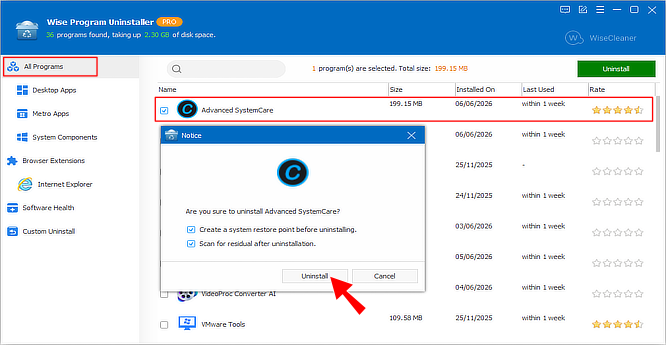
Users can view detailed information for each application, including:
- Program name and icon
- Disk space usage
- Installation date
- Last usage information
- User ratings
A built-in search feature helps locate programs quickly, while multiple uninstall modes allow users to remove software more thoroughly than the standard Windows uninstaller.
This section also categorises software into: Desktop Apps, Metro Apps, and System Components.
Browser Extensions Tab
The Browser Extensions tab helps users manage add-ons and extensions installed in supported web browsers.
It detects extensions installed in different browsers and displays all of them in this section.
So, you can disable or uninstall extensions without opening each browser individually.
Software Health Tab
The Software Health section analyzes installed applications and identifies items that may affect system performance, privacy, or storage efficiency.
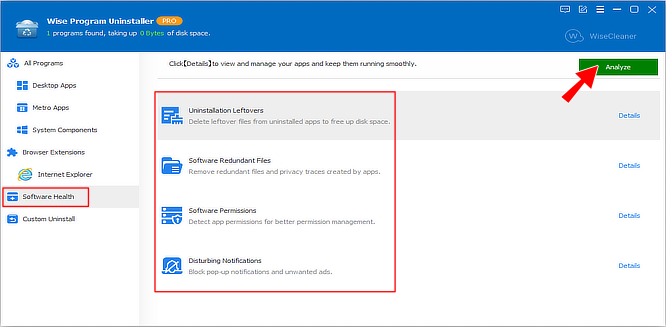
- Uninstallation Leftovers:
- Scans for files, folders, and registry entries left behind after programs have been removed. These leftovers can consume storage space and create unnecessary clutter.
- Software Redundant Files:
- Detects redundant files and privacy traces created by applications. Removing these files can help reclaim disk space and maintain a cleaner system.
- Software Permissions:
- Displays permissions granted to installed applications, allowing users to review and better manage software access rights.
- Disturbing Notifications:
- Identifies applications that generate unwanted notifications, pop-ups, or advertisements and helps users reduce these interruptions.
Software Health provides a convenient way to keep installed applications organized and maintain a cleaner Windows environment.
Custom Uninstall Section
Custom Uninstall helps you remove stubborn programs that cannot be uninstalled normally.
This feature is particularly useful for software that has broken uninstallers, missing entries, or applications that refuse to uninstall through conventional methods.
Simply browse for the program folder, and Wise Program Uninstaller will identify and remove the associated application along with its leftover files.
Key Features
- Completely uninstalls unwanted programs and removes leftover files
- Supports Desktop Apps, Metro Apps, and System Components
- Detects and manages browser extensions across different browsers
- Finds uninstallation leftovers and redundant software files
- Reviews software permissions for better app management
- Helps identify and manage disturbing notifications
- Removes stubborn programs that cannot be uninstalled normally
To get rid of giveaway terms
Buy 60% OFF Now
Buy Genuine Wise Program Uninstaller PRO License Key with 60% OFF Now!
Purchase a genuine license key for Wise Program Uninstaller via our exclusive link from the official product page. Enjoy free upgrades to new versions and premium technical support for free from WiseCleaner.com
Wise Program Uninstaller Professional License 1 Year / 3 PCs
✔ Free Updates for 1 Year
✔ Premium Technical Support by WiseCleaner.com
✔ Covered by WiseCleaner Money Back-guarantee
Steps to
Get PRO FREE (Giveaway)
Giveaway License Coverage
| License Type | Lifetime License |
| Supported OS | Windows 11, 10, 8, 7, Vista |
Giveaway Lifetime License & FREE Activation Steps
Check LOWEST Price to get genuine license code with maximum discount today!
giveaway vs paid
PRO License FAQs
What is Wise Program Uninstaller PRO Giveaway License?
Wisecleaner.com offers a special giveaway installer for Wise Program Uninstaller that activates the PRO version automatically once you complete the installation. This allows users to enjoy the premium features of Wise Program Uninstaller at no cost during the giveaway period.
However, there are some limitations/restrictions when using the PRO version activated through a giveaway installer.
This is the