MacX Video Converter Pro License Key

The software
Overview
MacX Video Converter Pro Overview
Official Website: www.macxdvd.com
Supported Systems: macOS
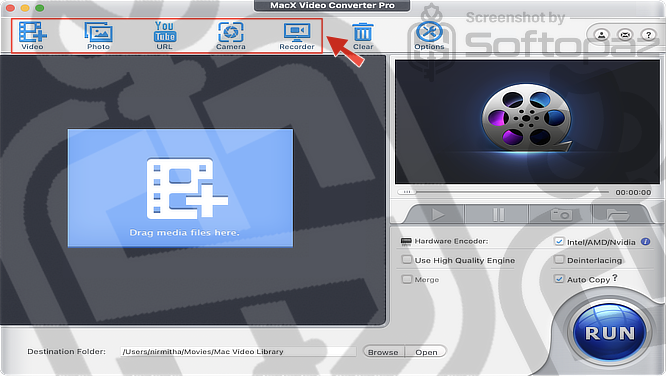
MacX Video Converter Pro helps you convert video files between different formats and optimise videos according to your device.
It comes with five built-in modules for handling videos, photos, online videos, camera footage, and screen recording.
Video Conversion Functions of MacX Video Converter Pro
MacX Video Converter Pro focuses on delivering high-quality video conversions while preserving the original video and audio quality as much as possible.
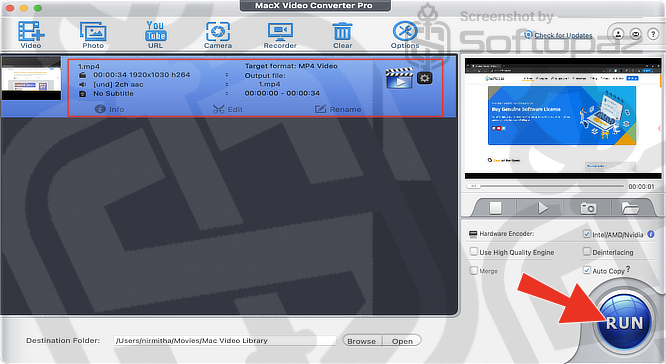
- Video Conversion
- You can convert videos between a wide range of formats or extract audio from video files. It supports popular SD, HD, Full HD, and UHD formats, including 4K, 5K, and 8K videos.
- Device-Specific Presets
- The software includes over 370 codec libraries and device-ready presets. So, it’s easy to convert videos for iPhones, iPads, Android devices, game consoles, and other platforms without manual configuration.
- Batch Processing
- You can add multiple videos and convert them in batches, helping save time when working with large collections of media files.
- Basic Video Editing
- MacX Video Converter Pro also includes basic editing tools for trimming, cropping, merging clips, and adding subtitles.
MacX Video Converter Pro includes 370+ codec libraries and device profiles. With hardware acceleration technology, it speeds up video encoding and conversion.
Photo Slideshow Creator
MacX Video Converter Pro also lets you create video slideshows from your photos.
You can combine images into video presentations, add background music, and apply transitions to make them more engaging.
The slideshow creator tool supports popular image formats, including JPG, PNG, and BMP.
Screen Recorder
MacX Video Converter Pro also includes a screen recording tool.
You can record on-screen activities along with microphone audio, making it useful for creating tutorials, recording gameplay, capturing online presentations, or demonstrating software workflows.
Video Downloader
The built-in video downloader allows you to download videos from more than 1,000 websites, including YouTube, Facebook, Vimeo, and Dailymotion.
To download a video, simply paste the video URL into the program, analyse the link, choose your preferred format, and start the download.
Key Features
- Convert videos between a wide range of formats, including UHD 4K, 5K, and 8K videos
- Use device-specific presets for quick conversion on phones, tablets, game consoles, and more
- Trim, crop, merge videos, add subtitles, and adjust video settings
- Convert multiple videos at once with batch processing
- Utilise hardware acceleration for up to 5X faster video conversion
- Create photo slideshows with music and transition effects
- Record your screen with system audio or microphone input
Getting started with MacX Video Converter Pro
To get rid of giveaway terms
Buy 50% OFF Now
Buy Genuine MacX Video Converter Pro License Code with 50% Off
Purchase a genuine license key for MacX Video Converter via our exclusive link from the official order page at the best price. Enjoy free automatic upgrades and free technical support from MacXDVD.com
Important Notice for MacX Video Converter Pro Buyers
MacX Video Converter Pro does not include AI-powered features and is no longer under active development, meaning future updates are not planned. We recommend checking out Macxvideo AI instead, which serves as the replacement product.
MacXVideo AI Coupon Codes
Steps to
Get PRO FREE (Giveaway)
Giveaway License Coverage
| License Type | Lifetime License |
| Supported OS | Windows 11, 10, 8.1/8, 7, Vista, XP |
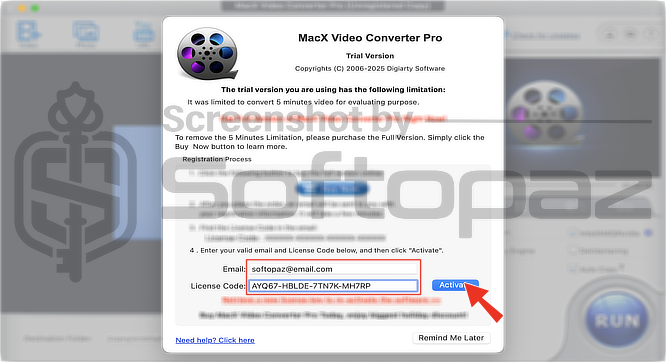
Giveaway License Key & FREE Activation Steps
AYQ67-HBLDE-7TN7K-MH7RPAYXQS-IGGLJ-KYQBT-KMYZVAY32M-GE6JD-YSS3J-NOFVUCheck LOWEST Price to get genuine license code with maximum discount today!
giveaway vs paid
PRO License FAQs
What is MacX Video Converter Giveaway License?
MacX Video Converter giveaway license is a special promotional license that is offered by the official site. You can activate full stand-out features for free legally with this. However, there are some limitations/restrictions when you activate the full version using a giveaway license.
This is the