OkayFreedom VPN License Key

Disclaimer:
This article is for informational and educational purposes only. Users are responsible for complying with all applicable laws and regulations when using the service. We do not encourage or support any illegal activities or misuse of OkayFreedom VPN. OkayFreedom VPN is intended for legitimate purposes such as protecting online privacy, securing personal data, and safely using public networks.
The software
Overview
OkayFreedom VPN Premium (Windows) Overview
Official Website: www.okayfreedom.com
Supported Systems: Windows 11, 10, 8/8.1
OkayFreedom VPN lets you route your internet connection through VPN servers in different countries.
It is designed to hide your IP address, encrypt your connection, and provide access to websites and online content from different regions.
Simple One-Click Connection
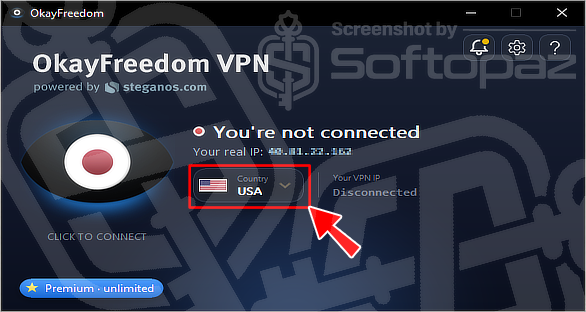
OkayFreedom VPN keeps the connection process simple. As shown in the below interface, you can select a country from the Country menu and connect with a single click.
It can also automatically select a suitable connection for you.
The main window displays your connection status, selected country, VPN IP address, and connection controls, so you can see the current VPN state at a glance.
No Account Required
One of the simpler aspects of OkayFreedom is that its free version does not require an account, email address, or password to get started. You can install the Windows application and connect directly.
Choose Your VPN Location
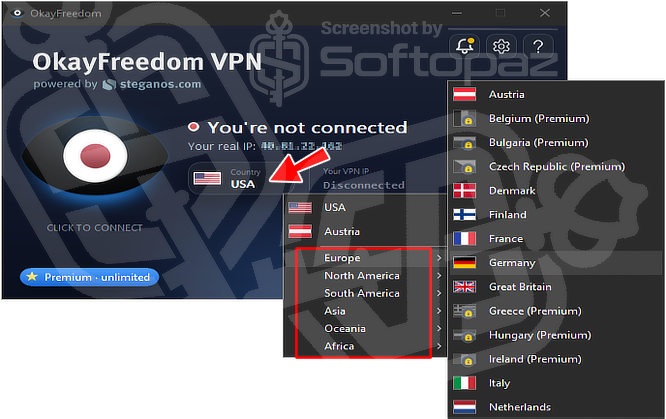
The location menu lets you select different VPN destinations.
The application groups locations by regions such as Europe, North America, South America, Asia, Oceania, and Africa, making it easier to find a preferred country.
You have 242 VPN server locations across 43 countries available, including the USA, Germany, UK, France, Japan, Australia, India, Singapore, Switzerland, and South Africa.
Secure Your Internet Connection
OkayFreedom encrypts the VPN connection using 256-bit AES encryption. This is intended to protect data sent through the VPN, including when using public Wi-Fi networks.
The service also hides your regular IP address by routing your traffic through the selected VPN server.
Browse From Different Countries
Changing the VPN location gives you an IP address associated with the selected server location. This can help when accessing websites or online content that is restricted based on location.
OkayFreedom also states that the VPN protects the entire internet connection rather than only traffic from a particular browser, so downloads and other applications can also use the VPN connection.
Privacy and Logging
According to OkayFreedom’s privacy policy, the service does not store users’ IP addresses or the addresses and content of websites accessed through its VPN servers.
The service is provided by Steganos Software GmbH, a German software company.
Key Features
- 242 VPN server locations and 43 countries
- 256-bit AES encryption
- IP address masking
- No registration required for the free version
- No browsing-activity logging according to its privacy policy
- Country and region selection
- Protection for browser traffic and downloads
- Automatic connection selection
Steps to
Get Full FREE (Giveaway)
Giveaway License Coverage
| License Type | 1 Year License |
| Supported OS | Windows 11, 10, 8, 7 |
OkayFreedom VPN Premium 1-Year Giveaway & Activation Steps
https://go.okayfreedom.com/downloadThen exit the Application and relaunch the OkayFreedom VPN App.
Check LOWEST Price to get genuine license code with maximum discount today!
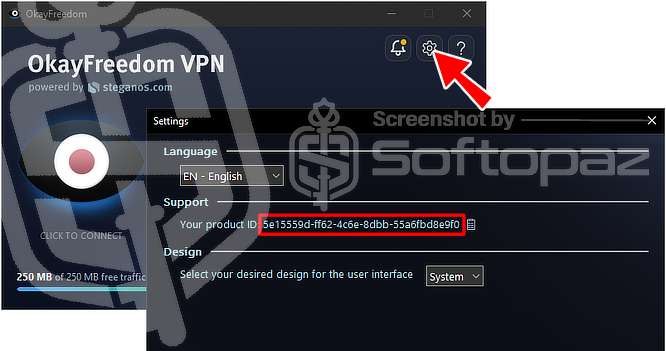
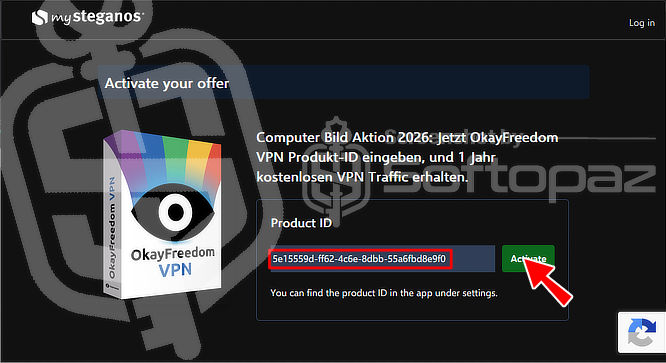
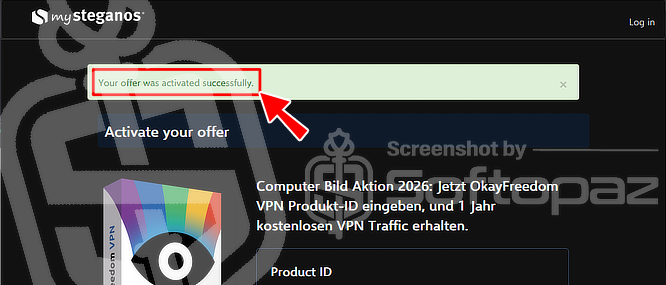
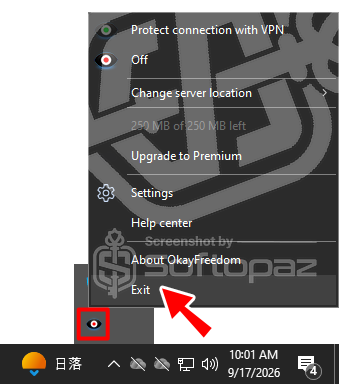
giveaway vs paid
Full License FAQs
What is OkayFreedom VPN Premium Giveaway License?
The OkayFreedom VPN Premium giveaway license is a promotional offer that provides access to premium VPN features for a limited period. These licenses are typically distributed through official promotions and may include certain restrictions or limitations.
This is the