
MultCloud License Key

The software
Overview
MultCloud Overview
Official Website: www.multcloud.com
MultCloud helps you to access, transfer, sync, and back up data across multiple cloud storage services from a single interface.
Let’s say you want to transfer files from Google Drive to Dropbox.
Instead of downloading and reuploading files, simply connect both cloud accounts to MultCloud and transfer data directly between them with just a few clicks.
You can link multiple cloud accounts to MultCloud and manage them conveniently from one platform.
Link Cloud Storage to MultCloud First
Before you can transfer, sync, or back up files between cloud services, you need to connect your cloud accounts to MultCloud.
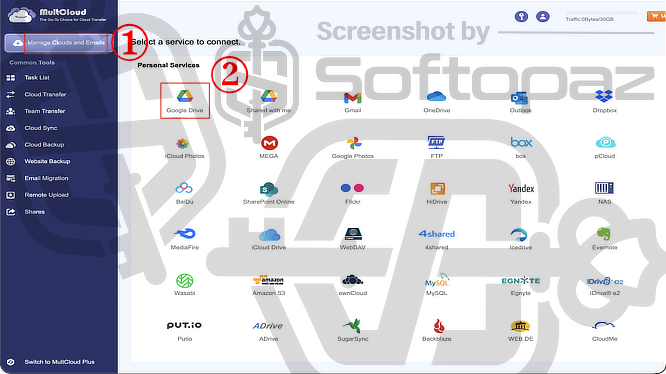
From the Manage Clouds and Emails page, click Add Clouds and Emails and select the cloud service you want to connect.
After selecting a service, authorise MultCloud to access your account.
Once connected, the cloud storage will appear in the left panel.
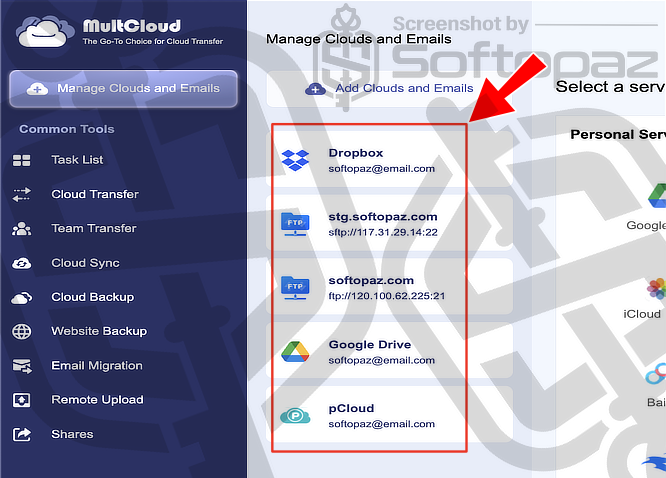
MultCloud supports a wide range of personal and business cloud platforms: Google Drive, OneDrive, Dropbox, MEGA, Box, SharePoint Online, Amazon S3, and many others.
Data Transer & Manage Tools
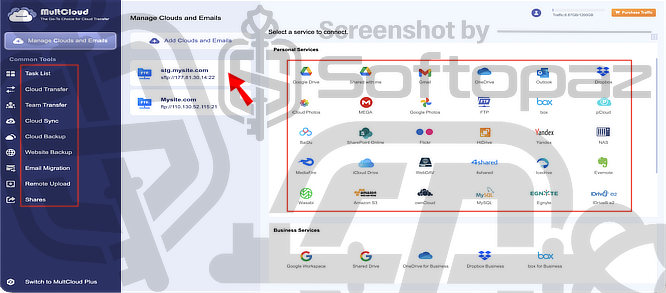
MultCloud offers seven tools.
- Cloud Transfer:
- Transfer files and folders directly from one cloud storage service to another without downloading and re-uploading data. Simply authorize access to both cloud accounts, select the source and destination locations, and create a transfer task.
- Team Transfer:
- Migrate users, files, and folders between business cloud platforms, such as Google Workspace and Microsoft 365. This tool is designed to simplify large-scale organizational migrations.
- Cloud Sync:
- Synchronize files between cloud services automatically. MultCloud offers multiple sync modes to help keep data consistent across different cloud accounts.
- Cloud Backup:
- Create backups of files and folders from one cloud service to another. You can also restore backed-up data when needed, helping protect against accidental deletion or data loss.
- Website Backup:
- Back up website data, databases, and related content to cloud storage for safekeeping and disaster recovery purposes.
- Email Migration:
- Transfer emails and attachments between supported email services or email accounts without manually exporting and importing messages.
- Remote Upload:
- Upload files directly to cloud storage using URLs, torrent files, or magnet links. The files are downloaded by MultCloud and saved to your selected cloud account without using local bandwidth.
Tasks Section
Once you initiate an operation in MultCloud; like transferring files from Google Drive to Dropbox, backing up data between cloud accounts, syncing folders, etc… They’ll be displayed as a separate task in the Task List.

The Task List allows you to monitor the progress and status of all your cloud operations in one place.
From here, you can view task details, start or stop tasks, rerun completed jobs, modify task settings, and manage scheduled operations.
This makes it easy to keep track of ongoing and completed transfers, syncs, backups, and other automated workflows.
Key Features
- Move files directly between cloud storage services without downloading them locally
- Keep files and folders synchronised across multiple cloud accounts automatically
- Back up data between cloud services and restore files when needed
- Access and manage multiple cloud storage accounts from a single dashboard
- Transfers run on MultCloud’s servers and continue even when your device is offline
- Automate transfers, syncs, and backups on a daily, weekly, or monthly schedule
- Transfer emails and attachments between supported email services
- Back up website files and databases to cloud storage
- Upload files directly from URLs, torrent files, or magnet links to cloud storage
- Migrate users and data between business cloud platforms
To get rid of giveaway terms
Buy 70% OFF Now
Buy Genuine MultCloud License Code with 70% OFF Now!
Purchase a genuine license code for MultCloud via our exclusive link from the official order page at the lowest price. Enjoy free updates and support from Multcloud.com
MultCloud Yearly License Unlimited Traffic
✔ 24/7/365 Priority Support by multcloud.com
✔ Covered by MultCloud money-back guarantee
MultCloud Lifetime License Unlimited Traffic
✔ 24/7/365 Priority Support by multcloud.com
✔ Covered by MultCloud money-back guarantee
Steps to
Get Full FREE (Giveaway)
Giveaway License Coverage
| License Type | 3 Month License |
| Software Type | Web Application |
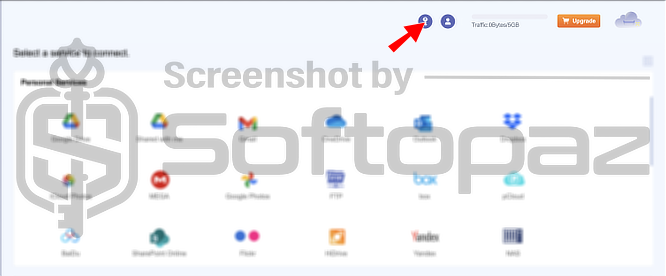
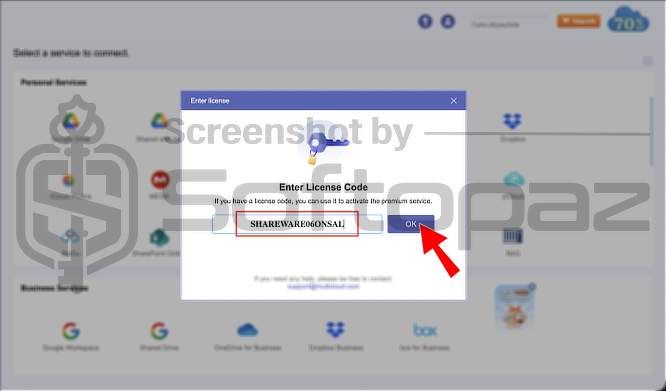
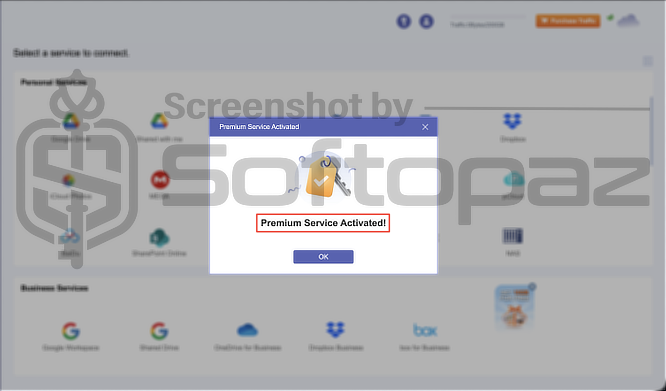
Giveaway License Key & FREE Activation Steps
SHAREWARE06ONSALBAAYK667N5K3K0N6Q7N4XK2M9R5V8C3PCheck LOWEST Price to get genuine license code with maximum discount today!
giveaway vs paid
Full License FAQs
What is MultCloud Giveaway License?
A MultCloud Giveaway License is a promotional license that lets you increase the default 5GB data traffic limit at no cost. Depending on the promotion, you can get 50GB, 200GB, or even 500GB of lifetime data traffic for free.
However, the giveaway version may come with certain limitations or restrictions compared to regular paid plans.
This is the




Code only provides for a 3 month license….NOT LIFETIME. First code didn’t work. Second code did.
Hi, Jerry! The lifetime giveaway is over. Currently, only 3 months are available.