360 Total Security Premium License Key

The software
Overview
360 Total Security Premium (Windows) Overview
Official Website: www.360totalsecurity.com
Supported Systems: Windows 11, 10
360 Total Security Premium helps protect, optimize, and maintain your Windows PC with security, privacy, performance, and maintenance tools in one place.
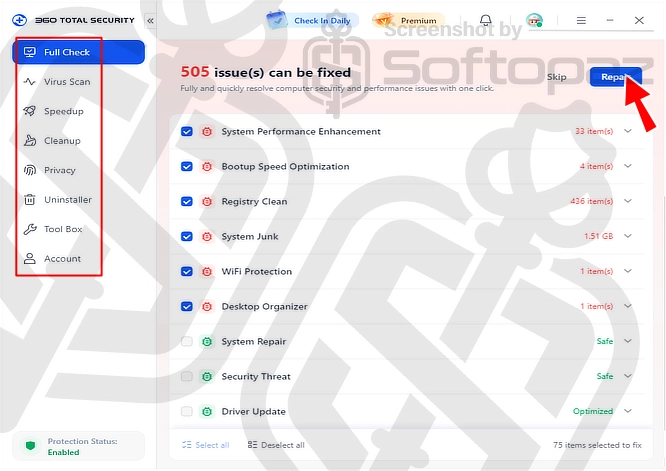
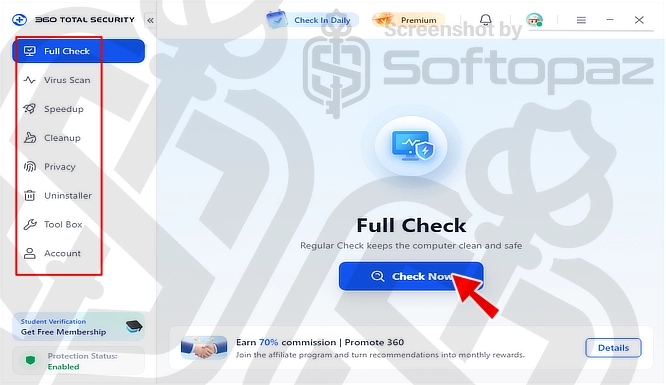
As you see in the above screenshot, the Full Check section scans the PC for a range of security and performance issues
This includes system performance, bootup speed, registry, system junk, Wi-Fi protection, and desktop organization.
If you choose 360 Total Security Premium, you won’t need to buy separate PC optimization tools, as it includes built-in features for speeding up, cleaning, and maintaining your PC.
Malware Protection Features
360 Total Security Premium combines five antivirus engines with multi-layer protection to detect and block threats.
It can also identify malicious and fraudulent websites while you browse and shop online.
- Virus Scan: provides Quick Scan for a faster check, Full Scan for a more thorough scan, and Custom Scan to check specific areas of your choice.
PC Optimization Tools
Here are the the built-in tools of 360 Total Security Premium that help improve system performance.
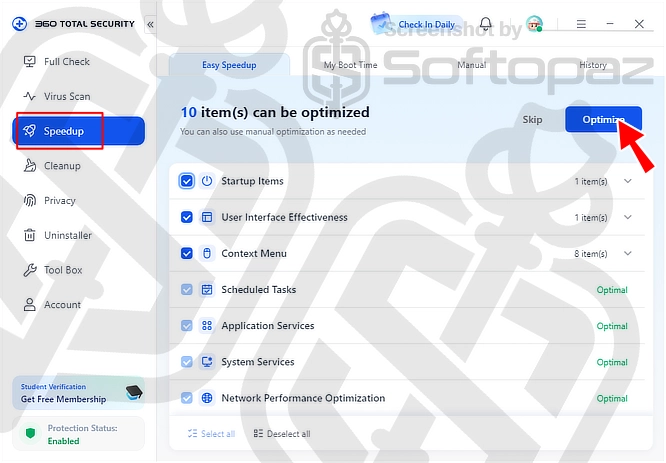
- Speedup:
- As you see in the above screenshot, the Speedup section helps optimize system performance by managing startup items, services, scheduled tasks, and other system settings with one click.
- Cleanup:
- This section helps free up disk space by removing junk and unnecessary files. It also provides options to clean large files, duplicate files, and system settings.
- Uninstaller:
- Managing and removing installed Apps is an important part of maintaining your PC. The Uninstaller section lists all installed apps and lets you review and uninstall unwanted programs directly.
Does 360 Total Security Premium protect my personal information?
Yes, 360 Total Security Premium helps protect your personal information with Privacy Data Protection, Data Shredder, and Anti-tracking tools.
Tool Box
The Tool Box section provides additional security, maintenance, and utility tools that you can install and use as separate programs on your PC.
Ex: 360 Windows 10 Shield, Network Diagnosis, 360 Zip, Ransomware Decryption Tool, Duplicate Cleaner, Desktop Organizer, Firewall, Disk Analyzer, Privacy Cleaner, Instant Setup, AD Blocker, System Disk Slimming, Scheduled Cleanup, Registry Cleaner, Document Protector, Browser Protection, Patch Up, and Windows 10 Universal App Editor.
Key Features
- Antivirus Protection: Detects and blocks malware, ransomware, and other online threats
- Real-Time Protection: Monitors your system continuously for suspicious activity
- System Optimization: Optimizes startup items, scheduled tasks, application services, auto-run plugins, context menus, and network performance
- PC Cleanup: Removes junk files, software caches, leftover plug-in files, and other unnecessary data
- Deep Cleanup: Finds large files, duplicate files, and system leftovers to help free up storage space.
- Privacy Protection: Protects sensitive files and helps prevent personal data leaks
- Data Shredder: Permanently deletes sensitive files to prevent recovery
- Anti-Tracking: Clears browsing traces and helps protect your online privacy
- App Uninstaller: Lists installed applications and lets you remove unwanted programs
Steps to
Get Full FREE (Giveaway)
Giveaway License Coverage
| License Type | 6 Months License |
| Supported OS | Windows 11, 10 (64-bit) |
360 Total Security Premium Giveaway License & FREE Activation Steps
https://free.360totalsecurity.com/totalsecurity/360TS_Setup_WW.WinningPC.CPI202609_6.6.0.1095.exehttps://winningpc.com/360-total-security-premium-free-license-key/#claim-free-licenseGo to the above site, enter your email, and they will send a unique license code to your email.
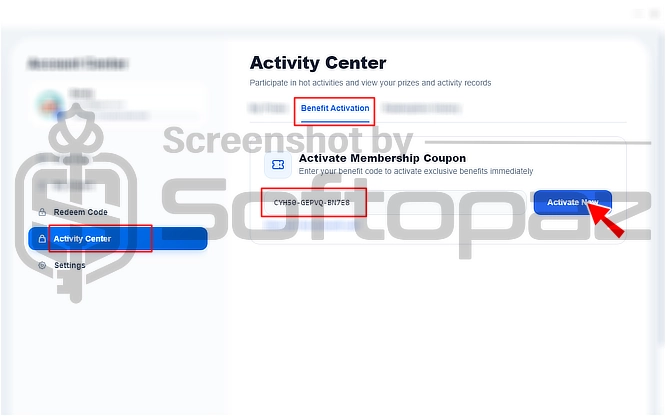
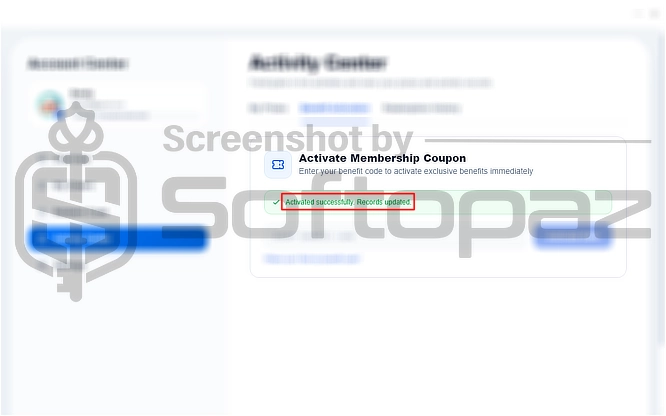
To activate, click on “Activity Center” -> “Benifits Acivation” -> Enter the obtained license code and click on “Activate Now”
Check LOWEST Price to get genuine license code with maximum discount today!
giveaway vs paid
Full License FAQs
What is 360 Total Security Premium Giveaway License?
360 Total Security Premium Giveaway License is a promotional type license that allows users to activate Premium features for free but in a legal way. It usually comes as a 6-month license. However, there may be some limitations/restrictions when activating with a giveaway license.
This is the